OAuth 2.1 Authentication
Connecting an assistant relies on OAuth 2.1. This mechanism provides standardised, secure access without ever sharing credentials with the assistant.
How it works
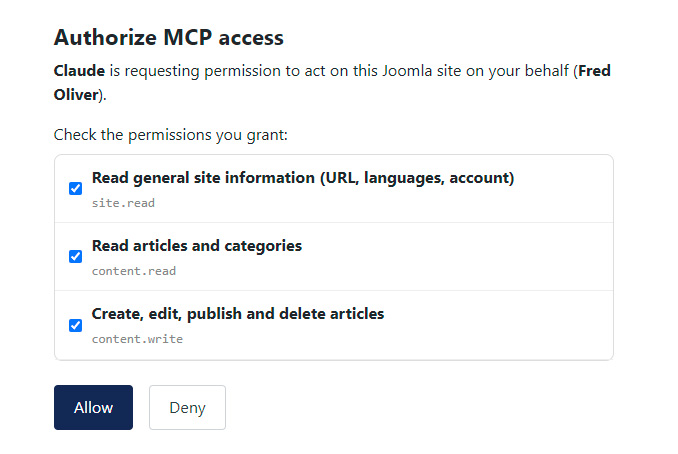
When you connect for the first time, the client registers automatically and you are redirected to an authorisation page on your site. You log in there with a Joomla account and approve access. The authorisation is tied to your site's declared domain.
Tokens & scopes
Once authorised, the client receives an access token whose scope is defined by a set of scopes. These correspond to the areas covered by the enabled plugins and remain aligned with your Joomla permissions: the token only allows what your account permits.
Validity period
The access token has a short lifetime and the client renews it automatically, without any action on your part. An authorisation remains valid for a maximum of 90 days by default (component setting); after this period, the client takes you back to the authorisation page. For every request and every renewal, the account must be active, not blocked and have the API Login permission (core.login.api); otherwise, the connection is refused until the issue is resolved. A refresh token reused after it has already been used terminates the entire connection, which must then be reauthorised.
The authorisation page displays the client's name and the domain it will redirect you to: check these before approving.
Revocation
You can cut off access at any time by revoking the token from your client, or by removing the authorisation on the site. The connection ends immediately, without affecting the operation of your site.